
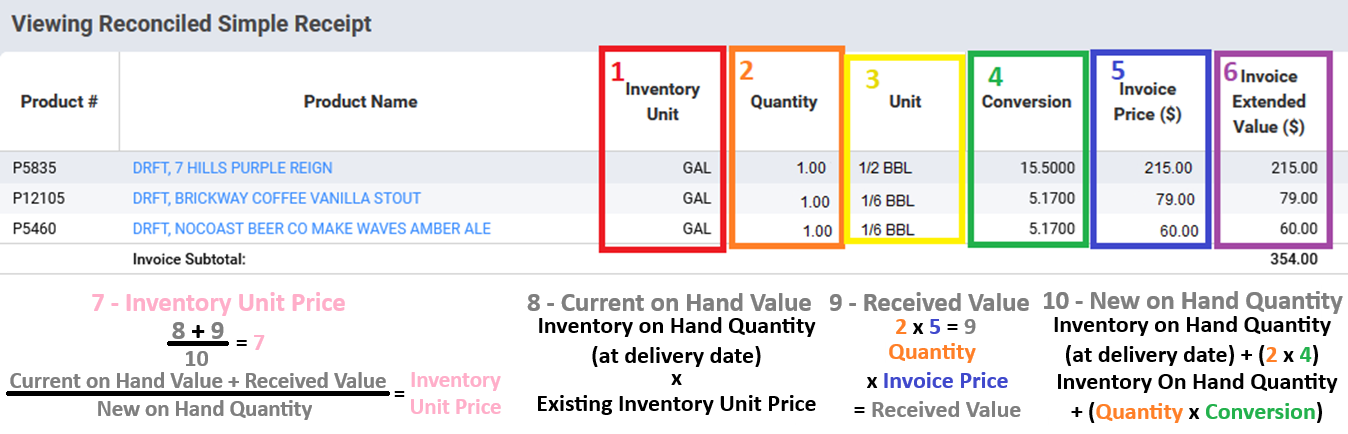
1. Inventory Unit
This is the Inventory Unit defined in the system.
It is system-wide and cannot be changed without specific approval from Operations.
2. Quantity
This is the Quantity you are going to add into inventory.
It must match with the unit and conversion in order to add the correct amount.
It must also match up with the Invoice Price to calculate the correct extended value.
3. Unit
This is the Vendor Unit.
This comes from the vendor but MUST match with the quantity and CONVERSION.
An incorrectly matched conversion WILL cause problems with inventory.
4. Conversion
This is the most critical part of the invoice.
This must correspond correctly with almost all other fields in the simple receipt to ensure there are no errors.
This value is used to change Vendor Units into Inventory Units.
5. Invoice Price ($)
This is the vendor price PER vendor unit.
Depends on what units you have decided to use.
Combines with the conversion to calculate the individual Inventory Unit Price.
Note: Inventory Unit Price cannot be seen on this screen.
6. Invoice Extended Value ($)
This is a calculated value based ONLY on the Quantity and Invoice Price.
This field does not relate to the conversion.
Used by the system to calculate the Invoice Subtotal.
7. Inventory Unit Price
This value does not appear on the invoice.
It is calculated with information from the invoice and information already in the system.
That means it cannot be verified from this screen.
If the invoice information is incorrectly entered, this will cause inventory variance.
This value is a “Weighted Average” value, which means that it is proportionally based on existing and new inventory quantities and pricing.
You can see this value in the Booking Journal.
8. Current on Hand Value
This value does not appear on the invoice.
This is the dollar value of the existing quantity of that item in the system.
It is calculated using the Inventory On Hand Quantity (quantity of that inventory item) multiplied by the existing unit price.
This value cannot be seen in any way on this screen.
It is often seen in the AvT Report, Analysis tab of the Inventory Review, and others.
It is used to calculate the Inventory Unit Price.
9. Received Value
This value does not appear on the invoice.
That means it cannot be verified from this screen.
This is the value of the inventory that is being received.
It is calculated using the Quantity and the Invoice Price.
It is used by the system to calculate the Inventory Unit Price.
You can see it in the Booking Journal after the invoice is reconciled.
10. New on Hand Quantity
This value does not appear on the invoice.
That means it cannot be verified from this screen.
It is calculated using the Quantity, Conversion, and the Inventory On Hand Quantity (at delivery date.)
It is used by the system to calculate the Inventory Unit Price.
You can see it in the Booking Journal after the invoice is reconciled.