
OVERVIEW:
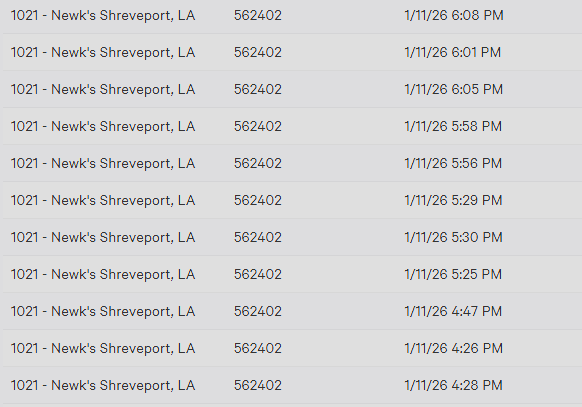
Larger orders sometimes timeout when posting to the POS. When this happens, the order may transmit but not fully close in Monkey Media, resulting in duplicate attempts to post. For example, order 540404 transmitted three times, with the third attempt successfully posting and closing out.
This issue can be corrected by sending the duplicate orders to the device in ToastTab, then voiding them to ensure sales reporting is accurate.
EXAMPLE OF DUPLICATE ORDERS:
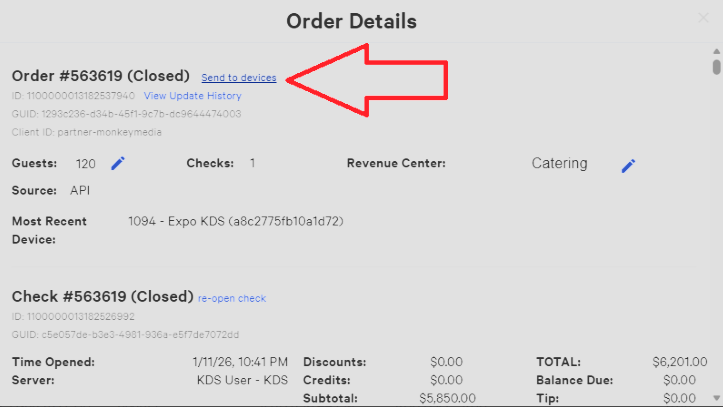
EXAMPLE OF HOW TO SEND TO DEVICES:
STEPS TO RESOLVE:
- Log in to ToastTab (Toast Web).
- Navigate to Reports > Sales > Orders.
- Filter the report to locate the duplicate order(s).
- Open the order and select Send to devices.
- Once sent, void the duplicate order(s) to correct sales.
- Confirm that the final, valid order is closed in both the POS and Monkey Media.
IMPORTANT: If you receive an error, contact Toast Enterprise Support or use the Chat feature in ToastTab.